Search This Website

Showing posts with label TIPS&TRICKS. Show all posts

Sunday, 24 December 2017

Dual WhatsApp: How to Run Two WhatsApp Accounts on One Phone

Image result for Dual WhatsApp: How to Run Two WhatsApp Accounts on One Phone

  • It's possible to have two copies of WhatsApp on one phone
  • Obviously, it has to be a dual-SIM phone
  • Some phone makers offer it as a built in feature

If you've got a dual-SIM phone, you can use the different SIM cards to make calls using separate numbers, and send texts using different numbers. But did you know that you can set up dual WhatsApp accounts, and use them both on the same phone? If you've ever wondered how to install two WhatsApp accounts on one phone, then you've come to the right place. There are a few different ways to do this, and some phone-makers are offering this as a built in feature. In other cases, you'll have to resort to third-party apps instead, but it's actually pretty easy to run two WhatsApp accounts on one Android phone. Sorry iPhone users, you are out of luck without resorting to the kind of methods we wouldn’t recommend.

Obviously, this method of running two WhatsApp accounts on one phone requires a dual-SIM phone - WhatsApp uses the phone number as your identity, and detects this via an SMS or call, so it has to be a phone with two SIM cards, which also out any iPhone. If you have a dual-SIM phone though, then the next step should be to check your settings, because it's quite possible that the manufacturer has already created settings or dual WhatsApp.

Many Chinese manufacturers allow you to create clones of apps, which can then be used with a dual-SIM setup. For example, on Honor's EMUI skin, the feature is called App Twin. On Xiaomi phones it's called Dual Apps. Vivo calls it App Clone, while Oppo calls it Clone App. The way each of these companies has set it up varies a little, so you'll want to check specific information for your handset, but we've listed the steps for some of the popular brands first. In case your phone doesn't support this feature, there's one more workaround you can try, listed at the end.

If you have an Oppo, Xiaomi, Honor
If you have one of these phones, then the steps you need to follow are incredibly simple, and they're also very similar across all three manufacturers, which is why we've gathered them together in one place. In all three cases, you'll start by installing WhatsApp on your phone via Google Play. After that, you can clone the app in the phone's settings.
dual apps settings WhatsApp

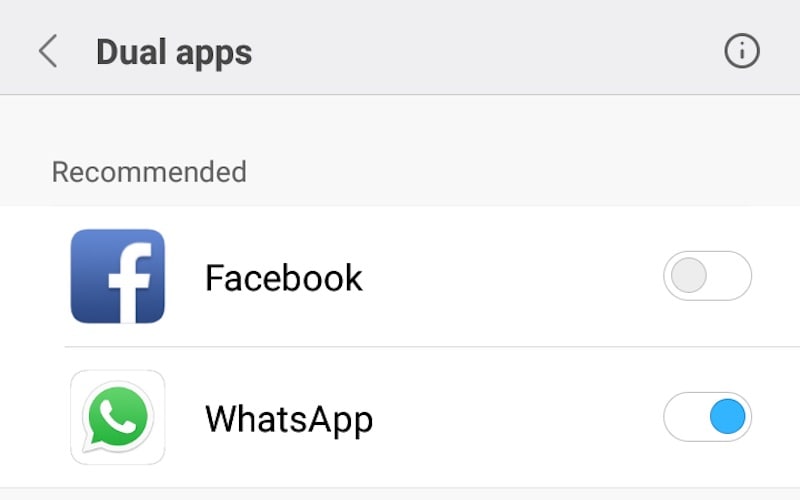
Here are the detailed steps to run two WhatsApp accounts on your Xiaomi phone, but it's very similar for the other two as well:

  1. After you've installed WhatsApp, go to Settings.
  2. Tap on Dual Apps. On Honor phones this is called App Twin, and on Oppo it's Clone App.
  3. You'll see a list of apps that can work with the feature, and toggles on the side. Turn the toggle on to clone any app.


That's it, you're done. Check if your manufacturer supports app cloning as well, and if yes, then these steps should work to get a second copy of WhatsApp on your phone. It's a little different on a Vivo phone, so we'll just explain that first, and then talk about how to set up the second WhatsApp.

How to run two WhatsApp accounts on a Vivo phone
The steps for Vivo are very similar to other brands, but slightly different. To clone WhatsApp on a Vivo phone (we tested this on a Vivo V5s), simply follow these steps:

  1. Go to Settings.
  2. Scroll down to find App Clone, and tap it.
  3. Now, toggle the switch to enable Display the Clone button.
  4. Next, Install WhatsApp on your phone via Google Play.
  5. Long press on any app icon. You'll see a small 'x' to remove apps, but some, like WhatsApp, will also have a small '+' symbol.
  6. Tap the + to clone WhatsApp on your phone.
Okay, so at this point, you should have two copies of WhatsApp on your phone. Here's what you have to do next.
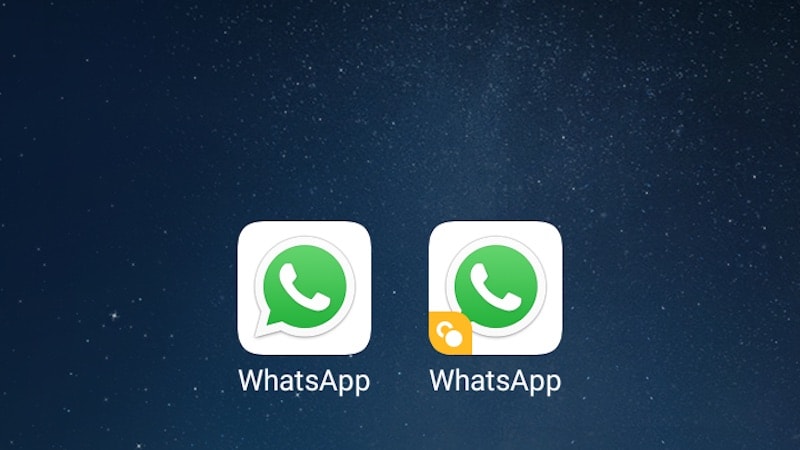
two whatsapp WhatsApp
Setting up Dual WhatsApp

Setting up your second WhatsApp account is extremely simple, just like setting up the first one. In case you've got any doubts though, here are the detailed steps.

  1. Start the second WhatsApp.
  2. On the next page, tap on Agree and Continue.
  3. Next, you can grant files and contacts access to this copy of WhatsApp by tapping Continue and following on-screen instructions, or tap on Not now for now.
  4. Now, you have to verify your phone number. This is the crucial part - remember, it has to be the second SIM phone number, if you type in you primary number you're just shifting WhatsApp access from one app to the next.
  5. Once you've typed in your number, tap Next, then confirm the number by tapping on OK.
  6. WhatsApp will then send a verification code to check the number, which it will auto-read if you've granted permissions. Otherwise, just type in the verification number, and you're good to go. In case you don't get the SMS, you can also tap the Call button on-screen to get a verification phone call.


That's it - now you've got two versions of WhatsApp running on your phone. You'll be able to send and receive messages using both numbers, so it's useful if you want to separate your personal usage from your professional usage, for example.

You can also use the steps given above to install multiple copies of other apps. If you want two Twitter apps or two Facebook apps on your phone, for personal use and a business account, for example, that's easy to do following the same steps, except you'd clone those apps instead of WhatsApp, obviously.

What if my phone doesn't support app cloning?


If your phone doesn't support app cloning, there's still a couple of ways to go ahead and install a second copy of WhatsApp. You'll still need a dual-SIM phone, in order to send and receive messages from two accounts. There are a few popular methods that we found online, and the one we thought was best is an app called Parallel Space.

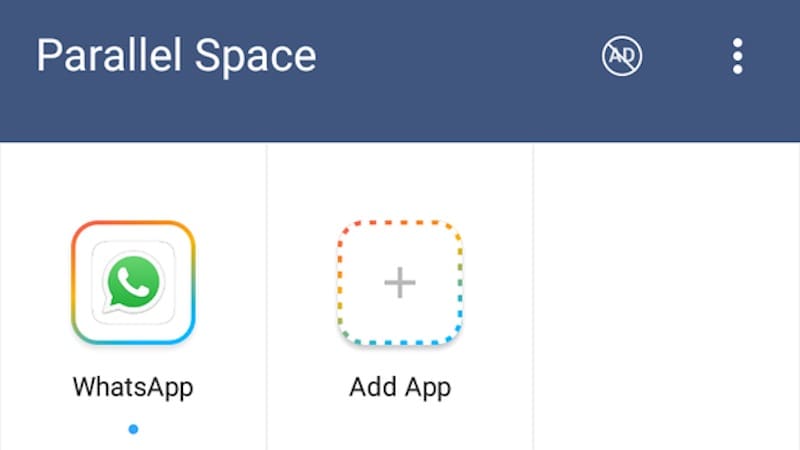
As the name suggests, this app creates a parallel "space" where you can install apps, which allows you to clone different apps. Here are the steps to using this app:
whatsapp parallel space WhatsApp

  1. You have to first install Parallel Space from Google Play. Once you start the app, it will immediately take you to a Clone Apps page.
  2. Select all apps you want to clone, and tap the Add to Parallel Space button.
  3. Next, you'll be taken to the parallel space, where the app is run in a virtual install on your phone.
  4. Now, continue to set up WhatsApp as described above.


That's it, you can use WhatsApp and other apps by accessing them through the Parallel Space app. The app is free but ad-supported, although ads can be removed with a subscription available as an in-app purchase; it's Rs. 30 per month, Rs. 50 for three months, Rs. 80 for six, and Rs. 150 for a lifetime subscription. Once again, this can also be used for apps like Facebook.

Another method which we found on a lot of sites is to install an app called GBWhatsApp, but this involves installing the app via APK, which does have a small element of risk involved. Besides that, it's only useful for a single scenario, which is running dual WhatsApp, so we believe that using Parallel Space is a better choice.

That's all there is to it. You can now start using both WhatsApp accounts at the same time. If you want to read more of our guides, check out our how-to section for lots of tips and tricks.

For the latest tipstricks and reviews, follow Apextipstricks on Google+, Facebook.

Friday, 15 December 2017

10 Steps to Maximize your Home Wireless Network Security

Home Wireless Network Security

1. Change the name of your home wireless network

The first thing you should do to is to change the name of your Wi-Fi network, also known as the SSID (Service Set Identifier).
While giving your Wi-Fi a somewhat provocative name such as “Can’t hack this” may backfire at times, other names such as “this is not a wifi” or “too fly for a wifi” are perfectly acceptable.
Changing your Wi-Fi’s name makes it harder for malicious hackers to know what type of router you have. If a cybercriminal knows the manufacturer of your router, they will know what vulnerabilities that model has and then exploit them.
But don’t name your home network something like “Andrew’s Wi-Fi”. You don’t want them to know at first glance which wireless network is yours when there are 3-4 other neighboring Wi-Fi’s. Also, disclosing too much personal information on a wireless network name may expose you to an identity theft operation.
This simple guide shows you how to change the name of your wireless network.

2. Choose a strong and unique password for your wireless network

Your wireless router comes pre-set with a default password. But it’s fairly easy for hackers to guess it, especially if they know the manufacturer.
A good wireless password should be at least 20 characters long and include numbers, letters and various symbols.
Use this guide to set up a strong password for your network. Friends coming over for a visit may complain about the unusual length of your password, but this might discourage them from needlessly consuming your data with boring Facebook or Instagram posts.

3. Improve your Wi-Fi security by enabling network encryption

Wireless networks come with multiple encryption languages, such as WEP, WPA or WPA2. WEP was first developed in the 1990’s, so it’s ancient by modern standards and easy to crack. WPA was more of a stopgap measure between WEP and WPA2, the encryption language still in use today.
But even WPA2 has multiple variants of its own. One is TKIP, but it’s a pretty old encryption method first developed with WPA, so it’s not very secure. The other is AES, short for Advanced Encryption Standard, and is an encryption system used by governments around the world, including the USA.
So the best encryption settings to increase your Wi-fi protection is WPA2 AES.
Fortunately, WPA2 AES is also a standard security system now, so all wireless networks are compatible with it.
The steps you should follow to change set up WPA2 AES varies across router models, but this is how you can do it for TP-LINK routers.
Read more about Wi-Fi encryption languages here.

4. Disable the wireless network when you’re not at home

We recommend you do this in case of prolonged absences, such as vacations. It closes any windows of opportunity malicious hackers might attempt to use while you are away.

5. Where are you placing the router in the house?

You wouldn’t think about this at first, but where you place your Wi-Fi also has a bearing on your security.
Place the wireless router as close as possible to the middle of your house. The first benefit is that all the rooms in your house have the same access to the Internet. The second benefit is that you don’t want to have your wireless signal range reach too much outside your house, where it can be easily intercepted by cybercriminals.
For this reason, don’t place your wireless router next to a window, since there’s nothing to obstruct the signal going outside your house.

6. A strong network administrator password will boost your Wi-Fi security

To set up your wireless router, you usually need to access an online platform or web page, where you can make modifications to your network settings.
Most Wi-fi routers come with default credentials such as “admin” and “password” which are easy for a malicious hacker to break into.
While changing the Wi-Fi password and name are good security measures of their own, go one step further and change the name of the network admin and the associated password. You’ll make it that much harder for cybercriminals to launch a Wi-Fi attack!

7. Disable Remote Access

Most routers allow you to access their interface only from a connected device. However, some of them allow access even from remote systems.
Once you disable remote access, cybercriminals won’t be able access to your router’s private settings from a device not connected to your wireless network.
To make this change, access the web interface and search for “Remote access” or “Remote Administration“.

8. Keep your router’s software up-to-date

Software is an important part of your wireless network security. The wireless router’s firmware, like any other software, contains flaws which can become major vulnerabilities and be ruthlessly exploited by hackers, as this unfortunate family would find out.
Unfortunately, many wireless routers don’t come with the option to autoupdate their software, so you have to go through the hassle of doing manual updates.
And even those Wi-Fi networks that can autoupdate sometimes require you to switch on this setting.
Yeah, we’ll be the first to admit that updates can sometimes be a chore. But unpatched software functions as an open invitation for cybercriminals who know how to exploit thoseunpatched vulnerabilities.

9. A firewall can help secure your Wi-fi network

Firewalls aren’t just software programs used on your PC. They also come in the hardware variety.
A hardware firewall does pretty much the same thing as a software one, but its biggest advantage is the addition of one extra layer of security.
The good thing about hardware firewalls, is that most of the best wireless routers come preinstalled with one. This page  can help you figure out if your router has a firewall built in and how you can activate it.
Even if your router doesn’t have one , you can install a good firewall device to your router in order to protect your system from malicious hacking attempts against your wireless network
These days, most people use the firewall solution provided by their operating systems. In case you are using dedicated security software that contains a firewall, it is a good idea to turn it on.

10. Protect the devices that connect most frequently to your wireless network

Don’t leave any exposed vulnerabilities for online criminals to pick on!
Even though you secured your router and wireless network, you need to make sure you don’t have any security holes that can be exploited by IT criminals.
Remember to always update to the most recent software available and apply the latest security patches to ensure no security hole is left open to online predators.
Even more, check which devices connect most often to your home network and make sure they have antivirus and antispyware security software installed
And finally, make sure to protect your devices using multiple security layers consisting of specialized security software such as updated antivirus programs and traffic filtering software.

22 Ways to Earn Money Online from Home Without Investment

Are you looking for the ways to earn money online? Did you try to make money online before but did not get success?
Then no need to worry anymore!
Because we have already trained more than 70000 people across the world & they are successfully making $200 to $2000 (more than INR 12,000) per month.
We are showing you below some of the best ways to earn money online. You can also download our training package which will help you to grow your income very fast.
And yes, everything in this website is Absolutely Free & Without Investment.

1.Virtual Assistant

A virtual assistant is like a personal assistant who can earn money by working online for someone without being physically present.
He can do variety of tasks like taking care of websites, counselling, writing & proofreading, publishing content, marketing, coding, website & app development, research etc.
There are dozens of companies like HireMyMomMyTaskerZirtualuAssistMe123Employee where you can signup for virtual assistant work.

2. Earn with Affiliate Marketing

If you are serious about earning money online & you are a hard working guy who wants to make big income then affiliate marketing is for you.
There is more scope for affiliate marketing than before because of the high growth of online shopping.
There are hundreds of online merchants like FlipkartAmazoneBayClickbankCJ etc. where you can signup & promote their products.
In affiliate marketing, you are simply helping customers to buy the right product by creating a simple website & in return you can earn 4% to 20% commission.
You can signup free here so that we can send you one of the best guide on affiliate marketing that can help you to earn great income.

3. AdSense & other Ad network

Although this one is the most favourite in my list but I put this in #4 because its not as easy as other 3 above & it takes time to make money from Google AdSense.
You need a website (which anyone can create now a days) & some tricks to bring the traffic on your website so that you can earn money from AdSense & other ad network.
We have prepared one of the best course on AdSense earning which thousands of people in India & all over the world have used & now they are earning $200 to $1000+ per month.
This training course is absolutely free & you can download after signup here.

 4. Earn Money from Survey

Here you can make money by completing small surveys which takes 5 minutes to 30 minutes depending on the requirement of a particular company.
You need to write your feedback & opinion in a survey. You just have to select your choice from the question & there is no need to write anything.
You can make $1 to $20 depending on the length of the survey, your profile & the country you are living.
Visit here to join 20 best survey sites & to know more about online surveys.

5. Become a Captcha Solver

If you have more time then you can add further income in your pocket by working as a captcha solver. This is the one of easiest way to earn money online.
As a captcha solver, you need to read the captcha images & type the exact characters. You need to be very fast in order to earn better income.
You can get paid up to $2 for every 1000 captchas you solve.
If you are interested in this then you can check this list of 10 best captcha entry sites.

6. Earn with GPT Sites

To add more income, you can also join GPT sites where you can earn money by taking small surveys, watching videos, playing games & doing many more activities.
We have worked on number of GPT sites but we will recommend only 3 sites which pays their member on time. You can receive your payment by PayPal, cheque or bank transfer.

7. Earn from PTC sites

If you are trying to earn money online & need only small extra income less than $200 (Rs.12,000) then PTC sites are the best way to start.
Here you need to click & read the advertisements for 10 to 3o seconds & get paid for each & every advertisement you view.
There are many sites where you can register & make money by reading ads. All sites are free & there is no investment at all.
You can check this list of 5 best PTC sites, signup & start earning.

8. Virtual Assistant

A virtual assistant is like a personal assistant who can earn money by working online for someone without being physically present.
He can do variety of tasks like taking care of websites, counselling, writing & proofreading, publishing content, marketing, coding, website & app development, research etc.
There are dozens of companies like HireMyMomMyTaskerZirtualuAssistMe123Employee where you can signup for virtual assistant work.

9. Writing Job

Writing is another better way to earn money on internet through writing different types of content. You can write for blogs, companies, institutions, individual people etc.
Different types of writers get paid differently. Normally people get paid $5 or more for 500 words content.
You can go to the sites like Elance, iWriter, WriterBay, FreelanceWritingTextBroker, ExpressWriters.com, FreelanceWritingGigs.com to find the content writing jobs.

10. Web design

If you have idea of web design & development then you can make money online by taking order from the customers who are looking to develop their website.
If you don’t have idea then you can take the training & then start this because this field has got a great potential. Either you can promote this offline or create your own website and promote 0nline.

11. SEO

This is one of the most popular business online & if you have idea of SEO then you don’t have to worry about making money online.
Companies spend hundreds to thousands of dollars every month on SEO so that their website can get on the top of Google for their business keywords.
You need to take the training from a popular institute like SEOTrainingCourse.co.in where you can learn practical SEO tips & implement the same to rank different types of sites.

12. Micro-working

If you are a kind of person who want simple ways to earn money online & not mare than $200-$300 (Rs.15000) per month then you can become a micro worker.
Here you can work on variety of different tasks like identifying an object, rating & commenting on different sites, visiting some websites, finding contact details, doing small research, writing small articles etc.
There are many websites like mTurkMicroWorkerSEOClerkClickWorkerGigWalkwhere you can work as a micro worker & earn extra income.

13. Seller on Fiverr

Fiverr is a place where you can do any service for $5. You can visit the website Fiverr.com & check which type of service you can do on Fiverr.
You can become a seller on Fiverr & create your gigs where you can tell people that you can do so & so for $5.
People see your gig & if they like it, they will order your service. Even if you complete 1 gig a day, you can make $150 or Rs.9000/- per month.
Our training material on Fiverr can help you to grow your business & you can make great money from Fiverr.

14. YouTube Channel

You go anywhere or do anything, if you love shooting videos on all these occasions then there is a great scope for you to earn money from YouTube.
All you need to do is upload the videos on YouTube & become a YouTube partner. For each & every view, you will get paid.
Sometime if any of your videos become viral then you can make huge money.

15. Become an online seller

Online selling is not like traditional selling. Here you just need to become a seller on some of the top shopping portals like eBay, Amazon, Flipkart, SnapDeal etc. & list the products you want to sell.
You can roam around your city & check for the best products you can sell on these sites. You need to try the best products that you can sell at lower than market price.
Trust me, its easier than your thought. Only thing you need to do is take action.

16. Domain Trader

Domain trading is another high profit business you can do online. But here you need some investment for buying the domain.’
You must be an expert OR you should get detailed knowledge before you start this business. You can buy domains from GoDaddy or other domain registrar for less than $10 & sell in future to the needy person for hundreds of dollars.
Your skill here is to identify great domains that are not booked yet & companies in future can try to buy that domain.
When companies don’t find the domain of their choice, they contact the domain owner for the deal & it’s in your control to fix the price.
You can even put your domains on auction so that people can buy directly at your desired price.

17. Website flipping

Like domain trading, website flipping is also a hot business to earn money online. Here you don’t deal with domains but websites.
You have to create a website, work on it for 3-6 months or more so that you can start making money from the websites.
After earning for 2-3 months, you can put that site on auction on Flippa & other platforms. You can easily get 15-20 times price of your monthly earning from that website.

18. Provide training & consultancy

If you possess some good skills & love to teach then you can start a training or consultancy business online.
You can provide training on English or any computer course, provide consultancy on vastu, any technical topic or if you are a doctor can provide consultancy for treatment etc.
There are number of things you can teach online. You can promote your business by creating a website or a Facebook page or by placing ads in classified sites etc.

19. Stock & Forex Trading

Stock trading & forex trading is a very lucrative way to make money for those who has good idea of the market.
There are number of free or paid courses available on internet that can train you for online trading. You can even read newspaper like Economic times or watch TV channels like CNBC to become more expert in the field.
Its risky to enter into this market without sufficient knowledge.

20. Earn money from your smartphone

There are various apps that can make you some small money by doing & completing some simple tasks on your Smartphone.
There are at least 10 apps that can earn you some extra income in the range of $100-$150 a month. You have to take simple surveys, complete offers by signup on other websites, play games, watch videos etc.
We will show you the list of these apps after you signup for our training.

21. Sell photos online

This is another use of your smartphone. You can take high quality images of nature, places, people, things, dishes, homes etc. & sell them online.
There are number of big sites like ShutterstockFotolia, , iStockPhotoPhotobucketwhere you can submit your photos.
Whenever some customer wants to purchase your photos, you will get paid as per the price you fix. You can get paid multiple time for the same photos.

22. Sell old stuff on OLX or Quikr

I am sure there may be number of things in your home that are lying unused for months & if you take little efforts, you can earn some good money.
You just need to do 2 things, i.e. find out all the items that you are no longer using, take high quality photos of these items from different angles & list these items on OLX & Quikr for sale.
Not only this, you can also ask your friends & relatives for selling their old stuff. You can help them selling these items & make some commission.
So these 18 ways can provide a perfect answer for your query ‘how to earn money online” & yes, you can shoot an email to us in case of assistance.
23. Become a freelancer
Freelancing is another popular way to make money after AdSense & affiliate marketing. As a freelancer, you can work with small or big companies on a temporary basis & provide them your services.
Freelancers can make $500 to $2000+ per month depending on the type of skills you will use as a freelancer.
You can work as a content writer, web designer, graphics design or provide services like SEO, data entry & many more.
There are dozens of popular websites like ElanceFreelancer.inWorkNHireUpworkPeople per Hour etc. that can give you the ready platform with ready clients.

Thursday, 14 December 2017

All Android Secret Codes

Image result for All Android Secret Codes
There is no doubt that Android is best OS for smartphones. In India, everyone owns anAndroid smartphone for his personal use. However, there are some Android Secret codes or android codes, you can do a lot of things with the help of these secret phone codes.Android has lots of features that you can take help from these mobile secret codes or in another way we can say android hidden codes. There are too many secret codes for android devices, well I came with working android phone secret codes. You can get lots of information about your android device, secret codes for android phones give you IMEI code without removing your battery. I want to tell you one thing that is these secret mobile phone codes doesn’t work on every smartphone. In current time, there are very fewer people who don’t own an android device. Well, I know you have an android smartphone that’s why you are here to check all Android Secret codes. 


All Android Secret Codes (Android Codes)

ADC Reading Secret Code*#228#
USB Logging Control*#872564#
System Dump Mode Secret Code*#9900#
Secret Code of Diagnostic Configuration*#9090
HSDPA/HSUPA Control Menu Secret Code*#301279
Phone IMEI Number check Secret Code*#06#
Secret Code for Monitor google Talk Service*#*#8255#*#*
Enable Voice Dialing Service Secret Code*#*#8351#*#*
Disable Data Dial Ling Service Secret Code*#*#8350#*#*
Hidden Code of Network Lock Status*#7465625#
Phone Audio Test Secret Code*#*#0673#*#* or *#*#0289#*#*
Field Test Android Secret Code*#*#7262626#*#*
ADC Reading Secret Code*#228#
Network Lock Status check code *#7465625#
USB Logging Control Secret Code*#872564#
FTA Hardware Information Secret Code*#*#2222#*#*
Android mobile FTA Software Information Secret Code*#*#1111#*#*
LCD Test Hidden Codes*#*#0*#*#*
RAM Details Hidden Menu Secret Code*#*#3264#*#*
Secret Code for PAD and Firmware*#*#1234#*#*
Hidden android secret codes to check Packet Loopback Test*#*#0283#*#*
Touch Screen Version Hidden Code*#*#2663#*#*
Back Ground Light and Vibration Test Secret Code*#*#0842#*#*
Hidden android secret codes for Sensor Test Code*#*#0588#*#*
Phone Information Hidden Test*#*#4986*2650468#*#*
Android Wireless LAN Test Secret Code*#*#232339#*#* or *#*#528#*#* or *#*#526#*#*
Build Time Secret Code*#*#44336#*#*
Mobile phone secret codes for Testing Menu*#*#4636#*#*
Factory Data Reset Secret code*#*#7780#*#*
Detailed Camera Information Secret Code*#*#34971539#*#*
Service Test Secret Code*#*#197328640#*#*
Touch Screen Test Code*#*#2664#*#*
Ram Details Test Code*#*#3264#*#*
Wi-Fi Mac Address Secret Code*#*#232338#*#*
Bluetooth Test Secret Code*#*#232331#*#*
Bluetooth Device Address*#*#232337#*#*
Power Off Secret Code *#*#7594#*#*
Quick GPS Test Code*#*#1472365#*#*
Different GPS Test Code*#*#1575#*#*
Mobile phone secret codes for Format your Smartphone*2767*3855#

Samsung Phone Hidden secret Codes (Samsung Android Secret Codes)

Android Secret Codes to check Samsung  Loopback Code*#0238#
Android Secret Codes to check Samsung  Software Version*#1234#
Mobile Secret Codes to check Samsung Hardware and Software Information*#12580 *369#
Android Secret Codes to check Camera Firmware*#34971539 #
Android Secret Codes to check Samsung Service Menu Secret Code *#0011#
Android Secret Codes to check Samsung Battery Code*#0228#
Android Secret Codes to check Samsung Service Mode Secret Code*#9090#
Android Secret Codes to check Samsung USB  Service Mode Secret Code*#0808#
Android Secret Codes to check Samsung Testmodus*#0*#
Android Secret Codes to check Samsung Factory Key String*#7284#


HTC Phone Hidden secret Codes (HTC Android Secret Codes)

Secret phone codes to check HTC EPST##3282#
Secret phone codes to check HTC Reverse Logistics Support##786#
Secret phone codes to check HTC Filed Trial Test##33284#
Secret phone codes to check HTC Function Test*#*#3424#*#*
Secret phone codes to check HTC Diagnostic Test##3424#
Secret phone codes to check HTC Vocoder##8626337#
Secret phone codes to check HTC Protocol Revision ##7738#
Android Secret Codes and Hacks
1. Complete Information About your Phone

Dial this number/code: *#*#4636#*#*

It gives you information about your phone and battery including, 

- Phone information
- Battery information
- Battery history
- Usage statistics

2. Factory data reset

The following number/code will be used: *#*#7780#*#*

Dialing this code will give you a prompt that will have the 'Reset phone' button. If you don't want to reset, then press cancel. If you choose to reser then the following data is removed,

- Google account settings
- System and application data and settings
- Downloaded applications

The following data is not removed:

- Current system software and bundled application
- Files on your SD card, like photos, music etc.

3. Format Android Phone

Number/code: *2767*3855#

This code formats your Android device, so do it only if absolutely necessary. The code is used in order to perform a factory format on your device and removes all settings and files, including the internal memory storage. It reinstall's the phone's firmware and there is no way to cancel this operation, except removing the battery from the device.

4. Phone Camera Update

Number/code: *#*#34971539#*#*

This code will give you information about the camera on your phone. The following four menus are shown,

- Update camera firmware in image
- Update camera firmware in SD card
- Camera firmware version
- Firmware update count

Using the 'Update camera firmware in image' option has been known to make your camera stop working, so it is advisable to not choose that option.

5. End Call/Power

Number/code: *#*#7594#*#*

This code allows you to manipulate the function of the power on/off/lock button on your smartphone. Instead of getting the options for silent mode etc. you can choose to make it turn off the power directly.

6. File Copy for Creating Backup

Number/code: *#*#273283*255*663282*#*#*

This is a very useful code that lets you backup your images, media files, video, voice memo etc. You will get a file copy screen allowing you to backup images.

7. Service Mode

Number/code: *#*#197328640#*#*

The idea behind entering the Service Mode is that you can run various tests on your device using this.

8. WLAN, GPS and Bluetooth Test Codes:

There are various codes that you can use for this one. 

- *#*#232338#*#* - Shows WiFi MAC Address

- *#*#1472365#*#* - GPS Test

- *#*#1575#*#* - Another GPS Test

- *#*#232331#*#* - Bluetooth Test

- *#*#232337#*# - Shows Bluetooth Device Address

9. Codes to get Firmware version information:

The following codes provide the firmware information about your device.

- *#*#4986*2650468#*#* - PDA, Phone, H/W, RFCallDate

- *#*#1234#*#* - PDA and Phone

- *#*#1111#*#* - FTA SW Version

- *#*#2222#*#* - FTA HW Version

- *#*#44336#*#* - PDA, Phone, CSC, Build Time, Changelist number

10. Codes to launch various Factory Tests:

There are various other factory tests that you can run on a smartphone.

- *#*#0283#*#* - Packet Loopback

- *#*#0*#*#* - LCD test

- *#*#0673#*#* OR *#*#0289#*#* - Melody test

- *#*#0842#*#* - Device test (Vibration test and BackLight test)

- *#*#2663#*#* - Touch screen version

- *#*#2664#*#* - Touch screen test

- *#*#0588#*#* - Proximity sensor test

- *#*#3264#*#* - RAM version 

20+ Best Hidden iPhone Secret Codes 2017


Here is list of top and best latest 20+ Best iPhone Secret Codes in 2017: We use iPhone in daily life but we don’t know much about iPhone. In this post we revealed some best iPhone secrets codes of 2017.
with these codes you can unlock new features and information in iPhone. As we all know iPhone is one of the best smartphones in the world and this is why it is much popular worldwide.
Open Dialer in iPhone and type these codes to know some hidden secrets about iPhone. These codes work on all iPhones. So try these iPhone secret codes on your phone.

*#06#

It will display your iPhone IMEI. It is an identifier for your mobile phone hardware.

*3001#12345#*

This code opens you field mode which contains all of iPhone personal settings, cell information, and newest network.

*#67#

You can check the number to call forward when the iPhone is busy. And again, but for when the iPhone is busy.

*646# (Postpaid only)

It will display your available minutes.

*225# (Postpaid only)

To check the Bill Balance

*777#

To check the Account balance use this code for prepaid iPhone only.

*#33#

You can check call control bars by using this code. Also for seeing whether barring is enabled or disabled for outgoing you can check all the usual suspects like fax, SMS, voice, information, etc.

*#76#

For checking connected line presentation is enabled or not you can use this code. You can also check whether the connected line presentation is enabled or disabled.

*#21#

You can set inquiry for call forwards. Find the settings for your call forwarding. You will see whether you have the fax, SMS, voice, knowledge, sync, async, paid access & packet access call forwarding enabled or disabled.

*3282#

It will let you know about the use of information info.

*#61#

To check numbers of missed calls.

*#62#

You can verify the number for forwarding calls If there is no service is available.

*3370#

EFR mode Enhanced Full Rate improves your iPhone voice quality, but it will slightly reduce battery life.

*#5005*7672#

To check SMS center.

*331*

Barring code # Outgoing calls abroad to block the lock code to inquire about her please contact your network operator.

*#43#

Call Waiting Status.

*43#

Activate a waiting.

#43#

Deactivate waiting.

*#31#

It allows you hide your number.

#31#Phone-number + call

For outgoing cal anonymity of your current call.

##002# -> Tap call

It will disable all call forwarding.